In my last post I protected SurrealDB on my Talos home-lab cluster with Kasten. The test data was deliberately tiny: five products, three customers and a handful of graph edges. That proved the method, but it left an obvious question. SurrealDB’s whole pitch is that it is one database for many data models. Does one backup really bring all of them back?
So I built a small demo app that uses every model SurrealDB offers: relational, document, graph, full-text search, vector search, geospatial and time series, with live queries on top. Then I broke all of it at once and restored it. This post walks through each model, what the app uses it for, how the protection covers it, and what it looks like when a bad thing happens and you get everything back to the last known good, consistent state.
Before getting into the models, one distinction that is easy to blur: availability is not resilience. My Kubernetes cluster keeps the database available: if a node or a pod dies, it is rescheduled and SurrealDB comes back. A managed service such as SurrealDB Cloud does the same for its platform. But availability faithfully keeps serving whatever is in the database, including a bad migration, a buggy deploy or a script run against the wrong environment. Keeping the data recoverable to a known good point is on us. So is being able to restore it somewhere else: to another Kubernetes cluster, and perhaps one day from my own platform to a managed one.
That is also why I protect the whole application namespace with Kasten, not just the database.
surreal export | Kasten with the keeper blueprint | |
|---|---|---|
| Consistent copy of each database | Yes | Yes: it uses the same export |
| The app, its Deployments, Services, routes and Secrets | No | Yes, from the same restore point |
| Scheduling, retention and an off-cluster copy | You build it | Policies, retention and export to object storage |
| Restore | Re-create everything around the data, then import | One action: the namespace comes back with a consistent database |
| Move to another cluster | Copy files and redeploy by hand | Restore the exported restore point on another cluster that runs Kasten |
In this post every restore went back into the same cluster. Restoring into a second cluster is the natural next test, and the dump is plain SurrealQL, which is also what a move to a managed SurrealDB would start from.
The demo app at a glance
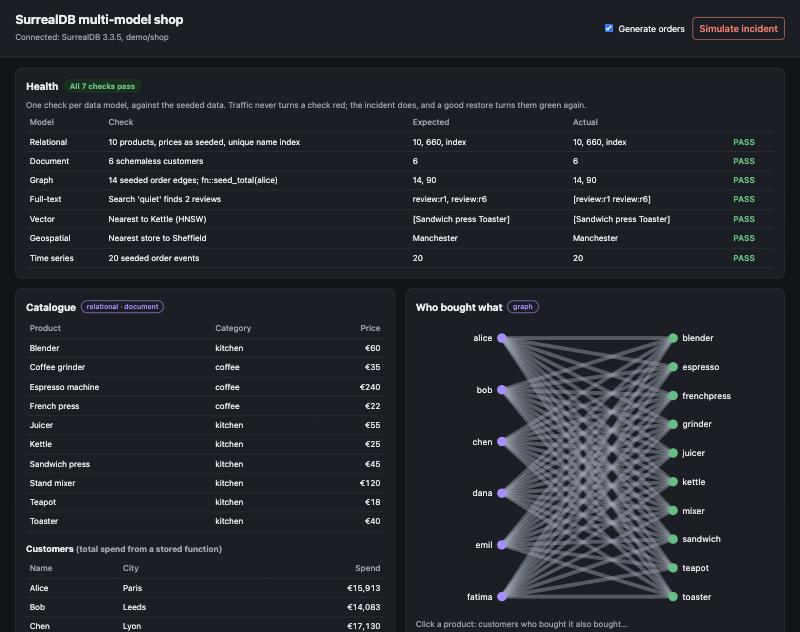
The app is a small shop: a catalogue, customers, orders, reviews and stores. It is one Go binary that serves a single web page, and it runs in the same namespace as SurrealDB and the keeper. That detail matters: one Kasten restore brings back the app, its configuration and its data together.
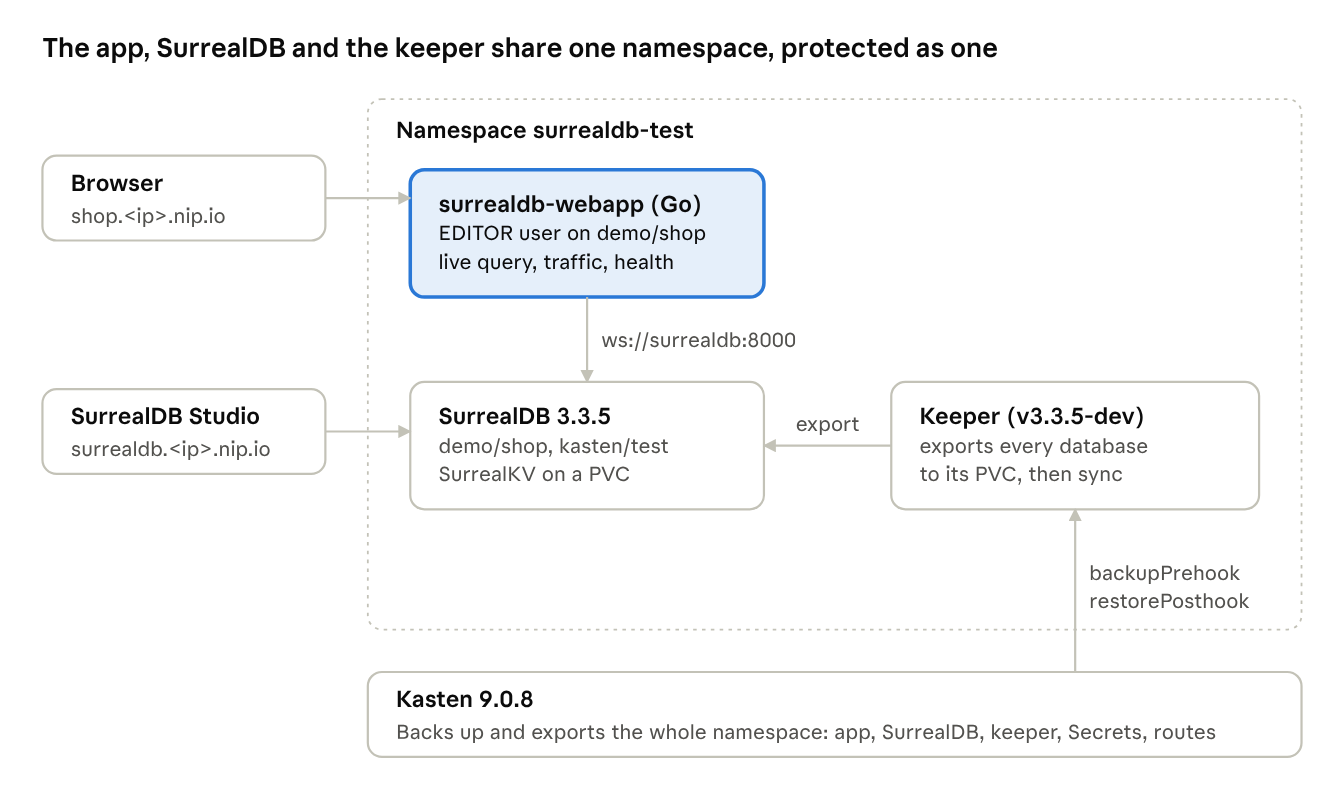
The app talks to SurrealDB over the internal Service, as a database user that can only work in
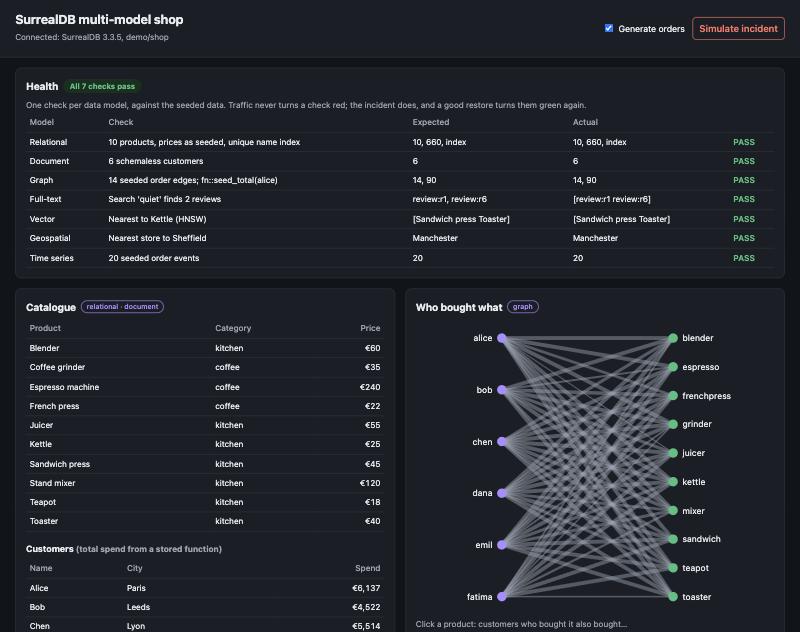
Each panel on the page is one data model, and a health panel at the top checks all of them.
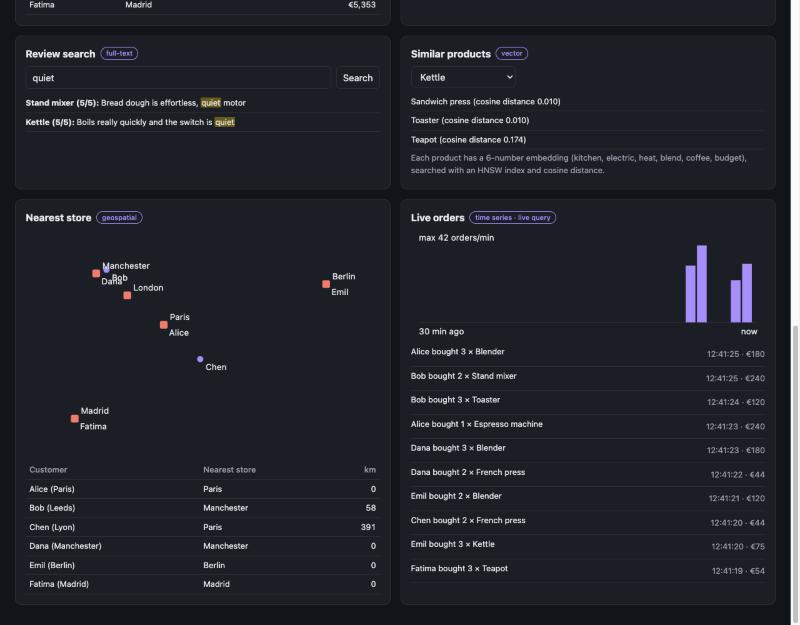
One database, seven models
Everything below lives in one SurrealDB namespace and database,
| Model | What the shop uses it for | Stored as |
|---|---|---|
| Relational | The product catalogue, with typed fields and a unique name | Schemafull table product |
| Document | Customers, whose shape can vary | Schemaless table customer |
| Graph | Who bought what, and “customers who bought this also bought” | Edge table ordered customer->ordered->product |
| Full-text | Searching product reviews | Table review |
| Vector | “Similar products” | embedding product |
| Geospatial | Nearest store to each customer | Point fields on store customer |
| Time series | Orders per minute and a live order feed | Table order_event |
Relational: the catalogue
Prices have to be numbers and product names have to be unique, so
DEFINE TABLE product SCHEMAFULL;

DEFINE FIELD price ON product TYPE number;

DEFINE INDEX product_name ON product FIELDS name UNIQUE;
Document: customers
Customers are schemaless: a name, a city and a location today, anything else tomorrow, with no migration.
UPSERT customer:alice SET name = 'Alice', city = 'Paris', location = (2.3522, 48.8566);
Graph: who bought what
An order is an edge between a customer and a product, and the edge has its own fields. Recommendations are a two-hop traversal with no JOIN: from a product back to its buyers, then forward to everything else they bought. A stored function,
RELATE customer:alice->ordered->product:kettle SET qty = 2;

SELECT out.name AS name, count() AS count FROM ordered

  WHERE in IN $p<-ordered<-customer AND out != $p GROUP BY name;
Full-text: review search
Reviews are indexed with an English analyzer (lower-case, stemming) and ranked with BM25. The app asks for highlights, so the matched words come back marked.
DEFINE ANALYZER review_en TOKENIZERS blank, class FILTERS lowercase, snowball(english);

DEFINE INDEX review_text ON review FIELDS text FULLTEXT ANALYZER review_en BM25 HIGHLIGHTS;

SELECT text, search::score(1) AS score FROM review WHERE text @1@ 'quiet';
Vector: similar products
Each product has a six-number embedding: how much it is about the kitchen, electricity, heat, blending, coffee and a budget price. I made these by hand so that the results are easy to explain on stage; a real app would use a model. An HNSW index answers nearest-neighbour queries by cosine distance.
DEFINE INDEX product_vec ON product FIELDS embedding HNSW DIMENSION 6 DIST COSINE;

SELECT name, vector::distance::knn() AS distance FROM product WHERE embedding <|3,40|> $p.embedding;
Geospatial: nearest store
Stores and customers have longitude/latitude points.
SELECT name, geo::distance(location, (-1.4701, 53.3811)) AS metres FROM store ORDER BY metres LIMIT 1;
Time series and live queries: orders
Every order is an event keyed by a ULID, an ID that sorts by creation time, so the latest orders are simply the highest keys. The chart groups events by minute, and the live feed is pushed to the browser by a SurrealDB live query: the app subscribes once, and SurrealDB sends each new order as it is written.
CREATE order_event:ulid() SET at = time::now(), customer = $c, product = $p, qty = $q;

SELECT time::group(at, 'minute') AS minute, count() AS orders FROM order_event GROUP BY minute;

LIVE SELECT * FROM order_event;
The ULID choice matters for backup cost too. In the first post, scattered changes made the export upload close to a full dump, while changes on consecutive keys cost a small fraction. Time-ordered keys put new orders at the end of the table.
How one backup covers every model
The protection is exactly the one from the first post, unchanged: the keeper-PVC blueprint, one Kasten policy, one backup and one export. I did not touch the blueprint to add the app. Its
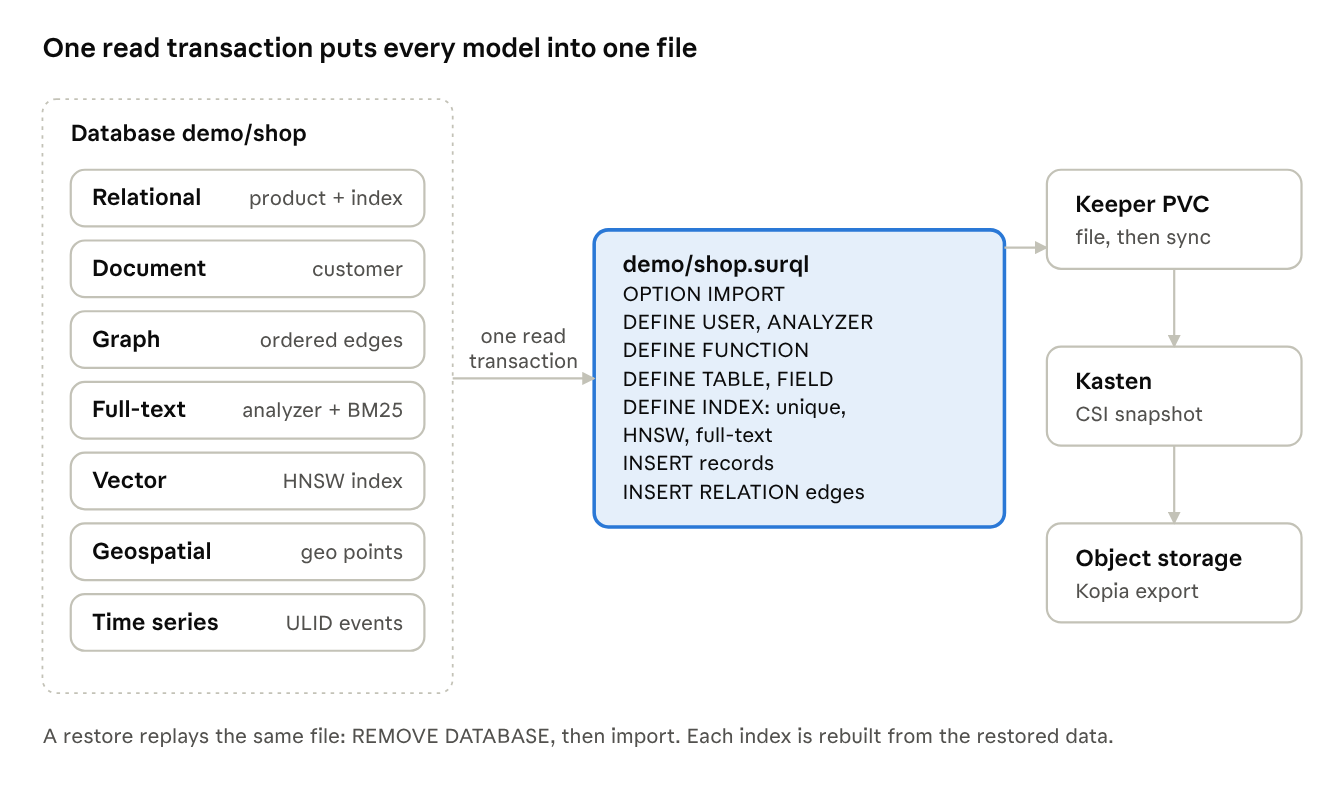
The reason one backup covers seven models is that, in SurrealDB, they are not seven systems. They are tables, fields, edges and indexes in one database, and
| Model | What the export writes |
|---|---|
| Relational | DEFINE TABLE product SCHEMAFULL DEFINE FIELD UNIQUE INSERT |
| Document | DEFINE TABLE customer INSERT |
| Graph | DEFINE TABLE ordered TYPE RELATION INSERT RELATION DEFINE FUNCTION |
| Full-text | DEFINE ANALYZER FULLTEXT ... BM25 |
| Vector | The HNSW embedding |
| Geospatial | The points, as part of each record |
| Time series | Every order_event |
Two things in that table matter more than they look. First, one read transaction: every model is captured at the same instant, so an order event can never be in the backup while its graph edge is not, even with orders being written during the backup. The app writes both in one transaction, and the export reads both in one transaction. Second, definitions, not just data: the dump carries the analyzer and the index definitions, so a restore rebuilds working search, not just the rows.
The dump also carries the app’s own database user (
The bad day
A backup only counts once you have watched it bring something back, so the app has a Simulate incident button. It damages every model in one go, which is roughly what a bad migration, a buggy deploy or a mistaken script against production does:
| Model | What the incident does | What you see in the app |
|---|---|---|
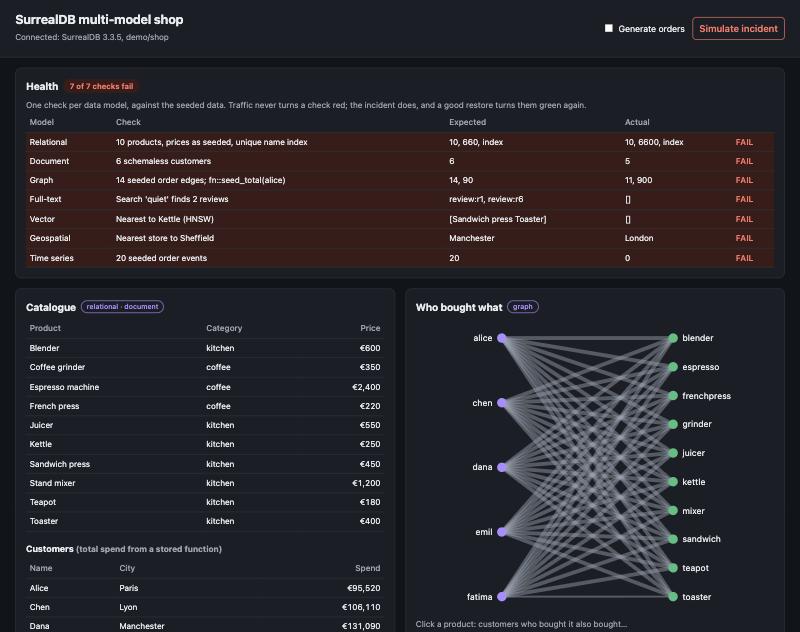
| Relational | Multiplies every price by 10 | Catalogue prices jump; the relational check fails |
| Document | Deletes customer:bob | Bob disappears from the customer list |
| Graph | Deletes Bob’s order edges | Fewer lines in the graph; seeded edge count and Alice’s total no longer match |
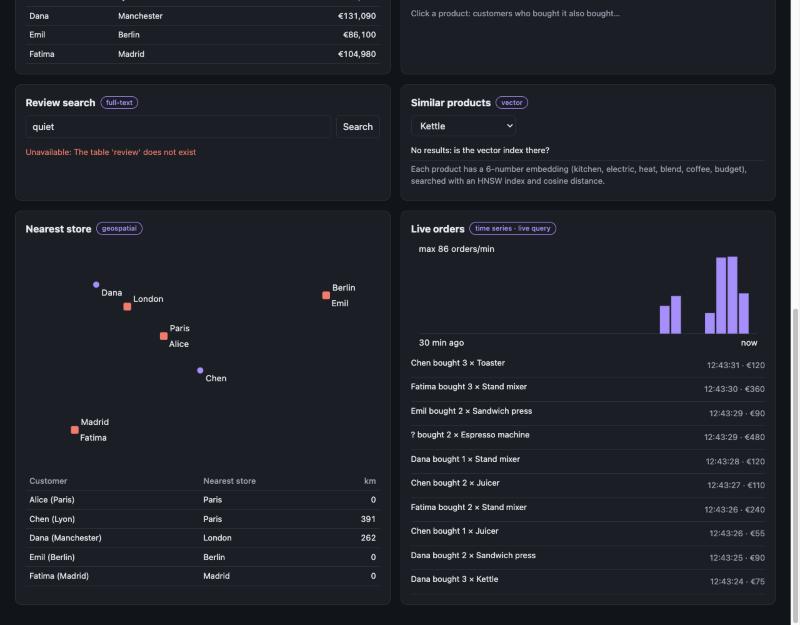
| Full-text | Drops the review | Review search finds nothing |
| Vector | Removes the HNSW index | Similar products returns nothing |
| Geospatial | Deletes the Manchester store | Sheffield’s nearest store changes |
| Time series | Deletes the seeded order events | The time-series check fails |
The health panel at the top of the app is what makes this visible in a demo. It runs one check per model against the seeded data, so live traffic never turns a check red; only damage does. Before the incident it shows 7 of 7. After it, 0 of 7.
Two of these are worth pausing on. Dropping a table and removing an index are schema changes, not data changes. A backup that only copied rows would bring the reviews back without their full-text index, and the products back without their vector index, and both searches would still be broken.
Back to the last known good state
The restore is one Kasten action. I picked the restore point that Kasten had exported to object storage, not the local snapshot, to prove the off-cluster copy is enough on its own. Here is the timeline from one run, with orders being generated throughout:
| Time (UTC) | What happened |
|---|---|
| 12:42:01 | Kasten backup: the prehook exports every database, including demo/shop |
| 12:43:30 | Simulate incident: the health panel drops to 0 of 7 |
| 12:43:58 | Restore starts from the exported restore point |
| 12:46:16 | Kasten has restored the PVCs and started the pods again, including the app |
| 12:46:36 | The restorePosthook |
| 12:46:36 | Health panel: 7 of 7 |
From the restore button to a healthy app took 2 minutes 38 seconds, most of it pulling the volumes back from object storage. Every model came back to the same instant, 12:42:01: prices, Bob and his orders, the reviews and their full-text index, the vector index, the Manchester store and the seeded order events. Orders written between the backup and the incident are gone, which is exactly what “last known good state” means.
Nothing was done by hand. There is no step where someone re-creates an index, re-runs a migration or re-defines the app’s database user: they are all in the dump.
One thing the demo caught
The first time I ran this with the app inside the cluster, the health panel went green but the live order feed stayed silent. The app had reconnected while the database was still being re-imported, and removing a database in SurrealDB also removes the live queries registered on it, without closing the connection. So the app was connected, healthy and subscribed to nothing.
The fix was small: every five seconds the app checks that its live query is still listed in
I ran the whole cycle again with the fix deployed. Five seconds after it reconnected, the app logged
What this does and does not prove
The demo is honest about its size, and so should this post be.
| It proves | It does not prove |
|---|---|
| One export captures every model in a database: records, edges, schema, analyzers, vector and full-text indexes, functions and database users | That it scales to your data: the shop’s dump is around 100 KB. Run the same test at real size, with your data types |
| The copy is consistent while writes continue: each database is read in one transaction | That separate databases are consistent with each other: each one is exported in its own transaction, so keep data that must agree in one database |
| A restore from the off-cluster copy brings every model back, and the app reconnects by itself | How long index rebuilds take at scale: on import, SurrealDB rebuilds the HNSW and full-text indexes from the data, so restore time grows with the data, not just the bytes |
| The restore puts the database back to the backup: changes made after it are gone, which is what you want after a bad change | Recovery to a point between backups: there is no log replay, so the backup schedule is your recovery point |
Root- and namespace-level users are not in a database export either. They come back with the SurrealDB data volume, which Kasten restores too, or from the Kubernetes Secret on an empty instance.
Try it yourself, and what’s next
The app is open source at MichaelCade/surrealdb-webapp: a single Go binary using the official SurrealDB Go SDK, plain HTML and JavaScript with no external libraries, and Kubernetes manifests. GitHub Actions publishes the image to
- Tour the panels with Generate orders on.
- Run the Kasten policy while the orders keep flowing.
- Click Simulate incident: 7 of 7 becomes 0 of 7.
- Restore from the exported restore point.
- Watch the health panel return to 7 of 7.
You need SurrealDB, the keeper and the blueprint from the blueprint-ai
| Component | Version tested |
|---|---|
| Talos / Kubernetes | 1.12.6 / 1.34.1 |
| Kasten | 9.0.8 |
| SurrealDB | 3.3.5, SurrealKV |
| SurrealDB Go SDK | 2.0.1 |
Next up is SurrealDB 4.0, which drops RocksDB and TiKV and keeps SurrealKV as its only on-disk engine. The Go SDK already supports it, so the same app should make a good test of the upgrade.
Sources
- SurrealDB README, v3.3.5: the data models SurrealDB supports
- SurrealDB Go SDK: supported server versions (3.3 and later, and 4.x)
- MichaelCade/surrealdb-webapp: the demo app, its schema and the demo script
- kastenhq/blueprint-ai#21: the keeper blueprint