I have been exploring databases a lot more in 2026, and the landscape is busy. There are “new” database vendors everywhere, on Kubernetes and as PaaS or DBaaS offerings. Some build on the shoulders of giants, mainly PostgreSQL and MySQL. Others start from a blank page.
One of the blank-page databases I keep coming back to is SurrealDB. In this post I deploy it on my home-lab Talos Kubernetes cluster, load a small sample dataset, and then protect it with Kasten. The aim is a copy that is consistent at the application level, sent off-cluster to object storage, and proven by restoring it.
Everything here is open source: the blueprint, the runbook and the test data are in a pull request to the blueprint-ai repository under
What is SurrealDB, and where could it be used?
SurrealDB is a multi-model database written in Rust: one engine for data you would otherwise spread across several databases. According to its README, it combines:
| Model | What that means in practice |
|---|---|
| Document and relational | Tables that can be schemaless or schemafull, with typed fields and unique indexes |
| Graph | Records joined by typed, directed edges ( RELATE a->ordered->b |
| Key-value, time-series, geospatial | Native data types instead of extensions |
| Retrieval | Full-text, vector and hybrid search |
You query all of it with SurrealQL, a SQL-like language, over HTTP, WebSocket or GraphQL, with multi-table ACID transactions. It also has row-level permissions, live queries that push changes to the application, stored functions, and an MCP server for AI agents. That combination is what makes it more than “another database”: it can act as the API back end as well as the data store.
The README lists the use cases it is aimed at: applications that mix several data types, a data layer for AI agents, knowledge graphs, real-time apps such as recommendation engines and fraud detection, and embedded or edge workloads.
Where can I run SurrealDB?
Almost anywhere: the same single binary is the server, the CLI and the import/export tool.
| Where | How |
|---|---|
| Managed | SurrealDB Cloud, where SurrealDB runs the infrastructure, monitoring and backups |
| Laptop or VM | One binary: brew install surrealdb/tap/surreal |
| Container | docker run surrealdb/surrealdb:<tag> start |
| Kubernetes | The official Helm chart ( surrealdb/surrealdb |
| Embedded | As a library inside an application, including in the browser |
The choice that matters most for protection is the storage engine, set by the start path:
| Engine | SurrealDB 3.3 | SurrealDB 4.0 |
|---|---|---|
memory | Yes, nothing written to disk | Yes |
surrealkv:// | Yes | Yes, the only on-disk engine |
rocksdb:// | Yes | Not in the build |
tikv:// | Yes | Not in the build |
I used SurrealKV on 3.3.5, because it is the engine that carries forward to 4.0. One trap: the Helm chart still defaults to SurrealDB 2.6 and to
The sample application
The sample is a tiny shop of about 1.2 KB, chosen so that a restore which only brought back rows would visibly fail. It lives in namespace
| Object | Content | What a restore must bring back |
|---|---|---|
product | Schemafull table, 5 records, UNIQUE name | Schema and index definitions, not just data |
customer | Schemaless table, 3 records | Free-form documents |
ordered | 5 graph edges: RELATE customer:alice->ordered->product:1 SET qty = 2 | Relations, with their own fields |
fn::order_total | Stored function that walks a customer’s ordered | Logic stored in the database |
One query checks everything at once, because the totals only come out right if the function, the edges and the products all survived:
RETURN { products: count(SELECT * FROM product), customers: count(SELECT * FROM customer), orders: count(SELECT * FROM ordered), alice_total: fn::order_total(customer:alice), bob_total: fn::order_total(customer:bob), chen_total: fn::order_total(customer:chen), has_index: (INFO FOR TABLE product).indexes.product_name != NONE };
A healthy database returns
To be clear, this is a very basic concept and dataset, built to show the protection workflow rather than a real application. A production database will hold far more data, and probably other data types too: vector embeddings, full-text indexes, time-series and geospatial records, live queries and more users and permissions. The export is a logical SurrealQL dump, so it should carry all of that, but I only tested tables, an index, a function and graph edges. Before you rely on this pattern, repeat the backup-and-restore test with data that looks like yours, at its real size.
Gotchas: running SurrealDB on Talos
None of these stopped the project, but each one cost time, so here they are in one place. The cluster is Talos 1.12.6 with Kubernetes 1.34.1 and Rook Ceph RBD (
| Gotcha | What you see | Fix |
|---|---|---|
| Talos warns on the restricted | helm install | Add runAsNonRoot RuntimeDefault allowPrivilegeEscalation: false |
| The image names its user nonroot | Pod stuck in CreateContainerConfigError | Set runAsUser: 65532 runAsGroup: 65532 |
| The production image has no shell | kubectl exec ... sh glibc-dynamic | Use the -dev |
surreal PATH -dev | sh: surreal: not found | Call /surreal |
| The CLI reads piped input one line at a time | A statement written over several lines returns parse errors for each partial line | Keep each statement on one line in files you pipe to surreal sql |
surreal sql | Scripts carry on after an error; the error is a JSON string such as ["The table 'x' does not exist"] | Check the output, not the exit code |
surreal --help | The root password from SURREAL_PASS | Never call --help |
| SurrealDB 3 re-creates the default main | REMOVE DATABASE main DEFINE DATABASE main | DEFINE DATABASE IF NOT EXISTS |
| The Helm chart defaults to 2.6 and the memory | Data is gone after a pod restart | Pin image.tag surrealdb.path: surrealkv:///data/srdb |
What about protecting this database?
SurrealDB gives you two building blocks, and neither is a backup strategy on its own.
| Option | What you get | What is missing |
|---|---|---|
surreal export | A consistent SurrealQL file per database | Scheduling, retention, an off-cluster copy, immutability, and the rest of the application (Secrets, Services, the Deployment itself) |
| A CSI snapshot of the data PVC on its own | The whole volume, fast | Only crash-consistent: SurrealDB has no command to pause writes or flush a clean state, so the copy must recover as if the power was cut |
The interesting part is the combination, and one fact makes it work:
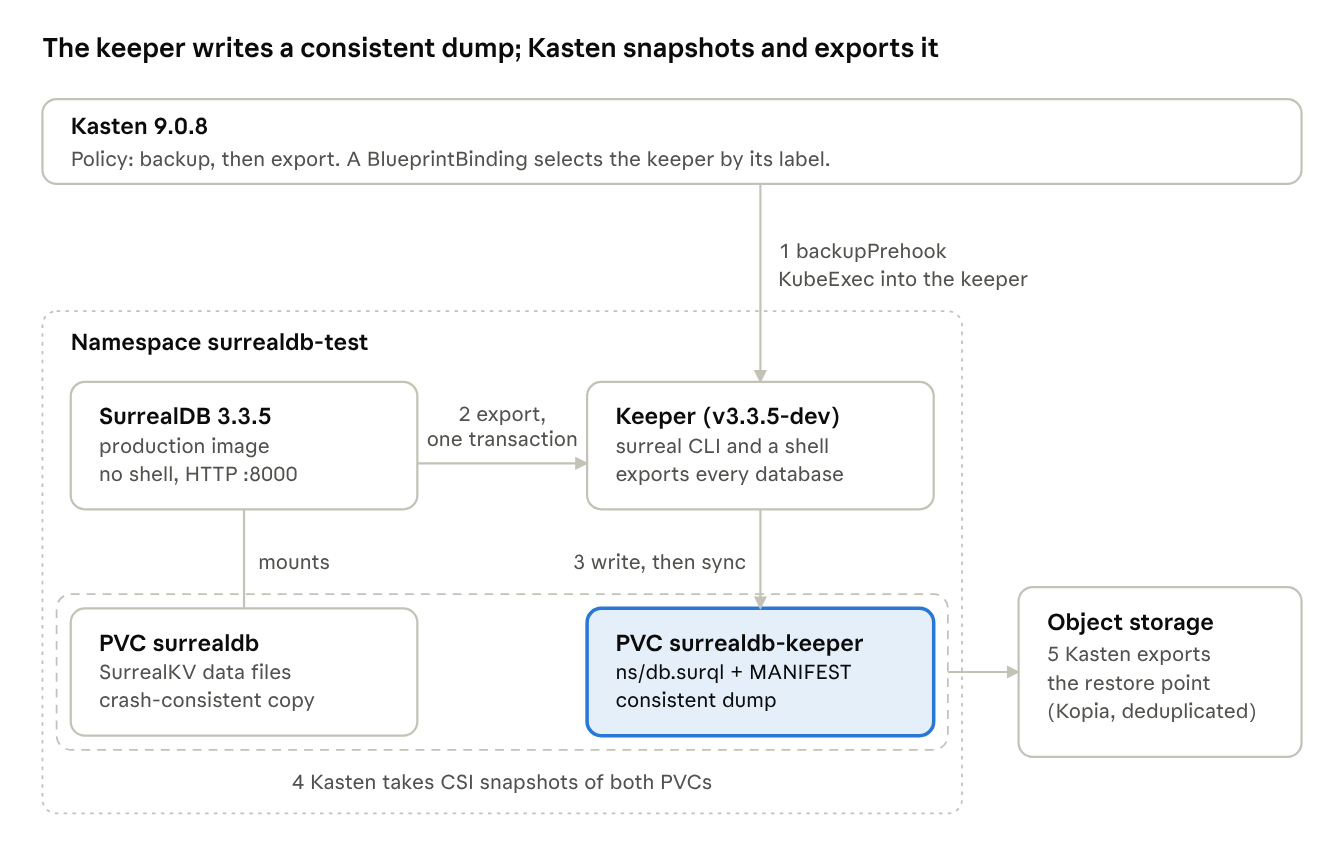
So the plan is: let SurrealDB produce the consistent copy, put that copy on a PVC, and let Kasten do what it is good at with PVCs. This is pattern 4 of the blueprint-ai method, a dump on a permanent keeper PVC:
- A small keeper Deployment sits next to SurrealDB. It runs theimage of the same SurrealDB version, so it has the-devCLI and a shell, and it permanently mounts its own PVC.surreal
- Before Kasten snapshots anything, Kasten execs into the keeper. The keeper exports every database over HTTP to its PVC, then runs.sync
- Kasten snapshots both PVCs and exports the restore point to object storage.
Why a keeper and not a second volume on the SurrealDB pod? Because the production image has no shell, so nothing could run
How Kasten orchestrates the whole application
Kasten protects the whole namespace in one policy: the Deployments, Services, the Secret and both PVCs. A Kanister blueprint adds the SurrealDB-specific steps at the right moment.
The arrows run in the order of a backup. Only the keeper writes during the prehook, and its
The blueprint has two actions:
| Action | When Kasten runs it | What it does |
|---|---|---|
backupPrehook | Before the PVC snapshots | Exports every namespace and database into a staging folder with a SHA-256 MANIFEST sync |
restorePosthook | After a restore, once the pods are running | Checks the dump, then removes and re-imports each database (next section) |
There is no
A BlueprintBinding attaches the blueprint to any Deployment labelled
The policy itself is a plain Kasten policy: back up the namespace, then export the restore point to an S3 Location profile. In my lab, the whole backup and export of the small dataset took about a minute.
What does a restore workflow look like?
A restore is one Kasten action with no manual steps before it, whether it goes back in place or into a new namespace. Two copies come back, and only one of them is authoritative:
- Kasten scales the workloads down and restores both PVCs from the restore point, from the local snapshot or from object storage.
- The pods start again. SurrealDB starts on its crash-consistent data volume, and SurrealKV recovers from it.
- Kasten runs the blueprint’sin the keeper, which:restorePosthook
- checks every dump file against the SHA-256 manifest before touching anything, so a damaged dump never costs you the live data;
- waits for SurrealDB to answer;
- for each database in the dump, runs,REMOVE DATABASE, thenDEFINE DATABASE IF NOT EXISTS.surreal import
- Every database is now exactly what the consistent dump held. Records written after the backup do not survive, which is the point of a restore.
The data volume still matters for what a database export does not hold: root- and namespace-level users and access methods. On an empty instance, the root user comes back from the Kubernetes Secret.
To test it, I damaged the data after the backup and restored from the restore point that Kasten had exported to object storage, which proves the off-cluster copy works on its own:
| Check | Before restore (damaged) | After restore |
|---|---|---|
alice_total | 2058 (kettle price changed to 999) | 110 |
bob_total | 0, 3 (Bob deleted, with his 2 edges) | 160, 5 |
customer:mallory | Present (added after the backup) | Gone |
| RestoreAction | Complete Restoring the dump taken at 14:44:32Z Restore complete |
I then deleted everything from the cluster and rebuilt it by running the runbook’s commands exactly as written, and got the same result.
Do we get any storage savings from Kopia?
Yes, but how much depends on where the data changes, not how much of it changes. Every backup writes a full dump, so the dump itself is not incremental. Kasten exports to object storage through Kopia, though, which splits files into content-defined chunks and uploads only chunks it has not seen before.
To measure it, I loaded 30,000 records of about 1 KB each with random content: a 30.8 MiB dump next to a 32.1 MiB SurrealDB data volume. Random content matters, because identical rows deduplicate far better than real data and make the result look much better than it is. I then exported four times and measured how much the repository in the bucket grew each time. Both PVCs are exported, so the figures include the data volume as well as the dump.
| Run | Change since the previous run | Repository growth | Share of the first export |
|---|---|---|---|
| 1 | 30,000 records loaded | 56.9 MiB (first export) | 100% |
| 2 | 1% of records rewritten, scattered at random | 29.1 MiB | 51% |
| 3 | No change | 0.4 MiB | 0.7% |
| 4 | 1% of records rewritten, consecutive keys | 3.6 MiB | 6.4% |
What that means:
- Unchanged data is almost free. An unchanged database produces a byte-identical dump, and SurrealKV did not rewrite its files while idle.
- Scattered changes cost close to a full upload.writes records in key order, insurreal exportstatements of 1,000 records. 300 random updates put about 10 changes in every statement, so every Kopia chunk of the file was new.INSERT
- The same 300 changes on consecutive keys touched one region of the file, and most chunks were reused.
For planning: a workload that mostly appends records with increasing keys (events, logs, time series) should export cheaply. A workload that updates rows across a large table should be budgeted as close to a full dump per backup. SurrealDB’s default record IDs are random, so new records behave like the scattered case unless the application uses ordered IDs such as
Wrapping up, and what’s next
SurrealDB has no write pause, but it does have something nearly as useful: an export that reads each database as one consistent snapshot. Put that export on a keeper PVC, flush it, and Kasten turns it into scheduled, off-cluster, restorable protection for the whole application, with no write pause and a restore that needs no manual steps.
| Component | Version tested |
|---|---|
| Talos / Kubernetes | 1.12.6 / 1.34.1 |
| Kasten | 9.0.8 |
| SurrealDB (Helm chart 0.5.0) | 3.3.5, SurrealKV |
| Storage | Rook Ceph RBD |
The blueprint is an
Next up:
- SurrealDB 4.0, released in November 2026. It keeps the same export and import CLI but drops RocksDB and TiKV, leaving SurrealKV as the only on-disk engine. Because 3.3 already runs on SurrealKV, I expect mostly an image-tag change, but that is a test to run, not a promise.
- Talos is still on my technology watch list, and this whole project ran on my Talos home-lab cluster. If you want to hear more about it, I have covered Talos in earlier posts on this blog.
Sources
- SurrealDB README, v3.3.5: features, use cases and install options
- SurrealDB Helm chart: chart values and defaults
- kastenhq/blueprint-ai#21: the blueprint, runbook and measurements